Xiaomi SU7: How to Display & Customize AI Pet Avatar on Car Screen | Full Guide
I have taken delivery of my new‑generation Xiaomi SU7. How can I project my pet onto the car screen?
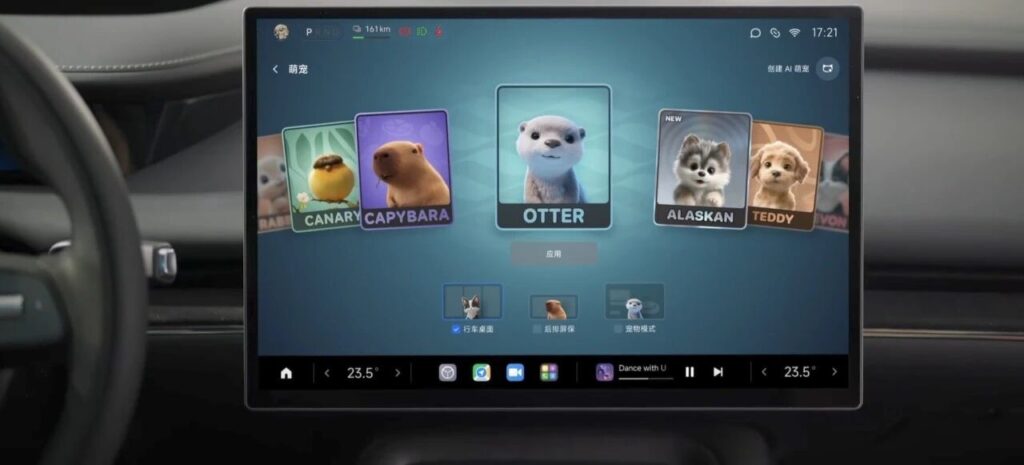
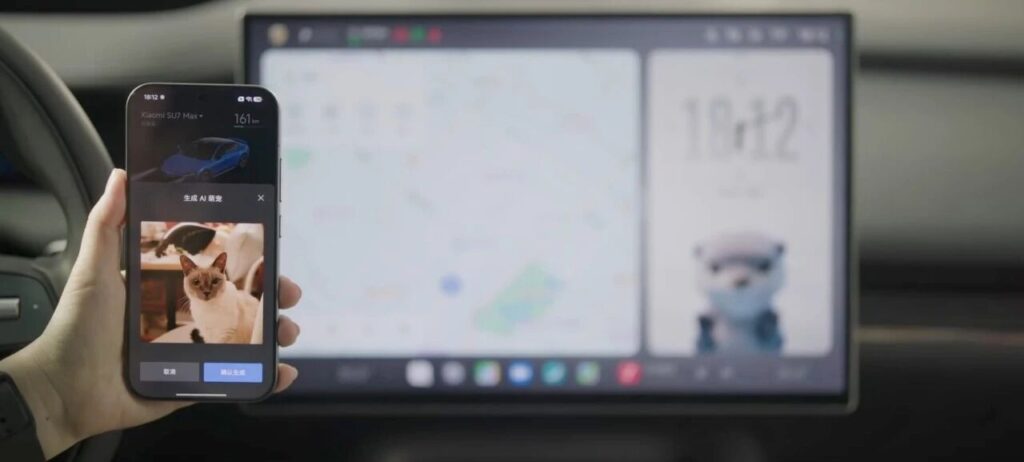
On the central control screen of your new‑generation Xiaomi SU7, open Super Toybox, select Cute Pet, then tap the small icon in the upper right corner of the page. Follow the on‑screen instructions to send a photo of your pet from your phone to the Xiaomi Car App. After a few minutes, a dynamic pet avatar will be generated.
To ensure optimal results, we recommend using a high‑definition, unobstructed photo with a clean background, and updating your Xiaomi Car App to version 2.3.3 or above.
Once generated, you can add the AI pet avatar to the driving desktop card, rear control screen, and Pet Mode. You can also interact with the avatar by tapping the desktop card.
Super Toybox also includes several pre‑installed cute pet characters: Otter, Devon Rex Cat, Pot Chicken, and Capybara.
In the Xiaomi Car App Mall, NFC versions of magnetic Otter and Devon Rex Cat dolls are available for a full “Cute Pet Planet” experience.
Besides pet avatars, Super Toybox offers two new features: Full‑Screen Easter Eggs and Custom Sound Effects. You can freely edit full‑screen easter eggs and special sounds for scenarios such as lock sound and charging plug connection. Feel free to explore more fun features.
Currently, these functions are only available on the new‑generation Xiaomi SU7. Other models will receive updates via OTA in batches. Please stay tuned.